Nous utilisons des cookies pour améliorer votre expérience sur notre plateforme. En cliquant sur "Accepter tous les cookies", vous acceptez que des cookies soient stockés sur votre appareil afin d'améliorer la navigation sur le site, d'analyser l'utilisation du site et de nous aider dans nos efforts de marketing.
Cookies nécessaires à la fonctionnalité de base du site web.
Cookies utilisés pour fournir le contenu le plus pertinent pour vous et vos besoins.
Cookies utilisés pour fournir le contenu le plus pertinent pour vous et vos besoins.
Cookies qui aident à comprendre les performances du site web, la façon dont les utilisateurs interagissent avec lui et à identifier les bogues.
Comment Zeffy peut être gratuit ?
Comment Zeffy peut être gratuit ?
Zeffy dépend entièrement des contributions optionnelles des donateurs. Lors de la confirmation du paiement, nous demandons aux donateurs de laisser une contribution optionnelles à Zeffy.
Automatisation de Zeffy Bookkeeping : créer un flux de travail Zapier qui fonctionne de manière autonome
16 février 2026
Vous avez effectué manuellement le rapprochement de vos paiements Zeffy. Vous avez peut-être même mis au point un système de tableaux croisés dynamiques qui fonctionne. Mais que se passe-t-il lorsque votre conseil d'administration vous demande une intégration avec QuickBooks qui fonctionne de manière autonome ? Dans ce guide, je vais vous expliquer comment nous avons automatisé notre flux de travail entre Zeffy et QuickBooks à l'aide de Zapier, transformant ainsi un processus mensuel de 30 minutes en un système entièrement automatisé qui génère des reçus de vente et des écritures de dons en temps réel. Pas d'exportations manuelles, pas de tableaux croisés dynamiques, juste une comptabilité claire qui s'effectue pendant que vous dormez.
Pourquoi l'automatisation ?
Lors de mon dernier webinaire, j'ai présenté le processus de rapprochement manuel que nous utilisons pour ventiler les paiements de Zeffy en écritures comptables prêtes à être enregistrées dans le plan comptable. Ce système fonctionne : il est fiable, reproductible et ne prend qu'environ 20 à 30 minutes par mois.
Mais voilà le truc : une fois que vous avez mis en place un système qui fonctionne manuellement, le plus dur est déjà fait. Vous maîtrisez la structure de vos données. Vous connaissez vos cas limites. Vous avez défini votre plan comptable.
À ce stade, l'automatisation ne vise pas à résoudre un problème, mais à gagner du temps.
« Une fois que nous avons bien maîtrisé le processus manuel, l'automatisation s'est imposée comme une évidence. Nous n'essayions pas de réparer quelque chose qui ne fonctionnait pas. Nous nous retirions simplement d'un processus qui n'avait plus besoin de nous. » — David Ducharme
Deux types de transactions, deux flux de travail
La première chose à comprendre concernant l'automatisation des transactions Zeffy, c'est que les dons et les ventes sont fondamentalement différents d'un point de vue comptable.
Faire un don, c'est très simple :
Montant du don à la campagne
Montant facultatif du don supplémentaire
Les deux sont rattachés à la fois aux comptes de produits et aux classifications de fonds
Une fois que la fonctionnalité de sélection de fonds de Zeffy sera lancée en mars 2026, le processus sera encore plus simple : les donateurs choisiront leur fonds directement sur le formulaire, et ce choix sera automatiquement pris en compte dans votre système d'automatisation.
Les formulaires de vente sont plus complexes :
Comptabilité par poste (produits vendus individuellement)
Chaque produit correspond à un article dans QuickBooks
Chaque transaction peut comporter plusieurs éléments
Affectation correcte des fonds soumis à des restrictions
En raison de ces différences structurelles, nous utilisons des flux de travail automatisés distincts pour les dons et les ventes. Cela permet de clarifier la logique et d'éviter qu'un type de transaction n'interfère avec l'autre.
L'architecture : tables de correspondance ou duplication
Lors de la création d'automatisations, vous devez faire face à un choix conceptuel fondamental : tables de correspondance centralisées ou flux de travail dupliqués.
Nous utilisons les deux — de manière stratégique.
Pour les commerciaux : tables de référence
Notre système d'automatisation des ventes utilise des tables de correspondance pour :
Faire correspondre les produits Zeffy aux articles de produits/services de QuickBooks
Attribuer les catégories QuickBooks appropriées (restrictions de fonds)
Les tables de correspondance centralisent la logique. Lorsque nous ajoutons un nouveau produit à Zeffy, nous ajoutons une ligne à la table de correspondance, et l'automatisation s'en charge automatiquement. Il n'est pas nécessaire de dupliquer ou de modifier le flux de travail lui-même.
Le compromis : les tables de correspondance nécessitent une maintenance. Si votre catalogue de produits change fréquemment, vous devrez mettre à jour un tableur. Mais pour nous, la centralisation en vaut la peine : le fait de gérer les correspondances de produits à un seul endroit réduit les risques de dysfonctionnement.
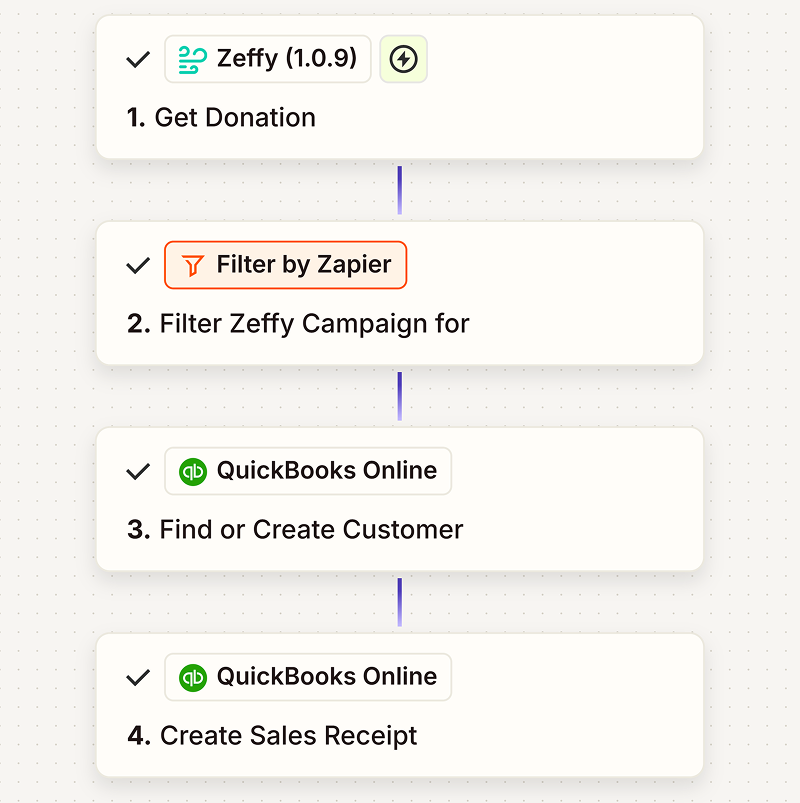
Pour les dons : duplication du flux de travail
En ce qui concerne les dons, nous adoptons une approche différente. Au lieu d'utiliser des tables de correspondance, nous reproduisons une automatisation de base vierge et l'adaptons :
Le filtre de campagne
Devoir du cours sur QuickBooks
Le code produit correspondant
Pourquoi privilégier la duplication plutôt que les requêtes ? Pour l'isolation. Si un processus de don tombe en panne, cela n'affecte pas les autres. Chaque campagne fonctionne de manière indépendante, ce qui facilite le dépannage et réduit le risque de défaillances en cascade.
Comment les flux de travail commerciaux acheminent les transactions
Nos processus de vente commencent par des « portes d'entrée » : des filtres basés sur les mots-clés de la campagne qui acheminent chaque transaction vers la catégorie appropriée.
Voici comment cela se présente :
Routage basé sur les campagnes :
Harrisburg → Cours de la section de Harrisburg
Homestead → Cours sur le chapitre « Homestead »
DMV → Cours du chapitre DMV
Honorifique → Catégorie de fonds honorifique
Tout le reste se répartit en deux catégories :
Marchandises non réclamées, ou
Encans
Nous distinguons les articles mis aux enchères des produits habituels, car le mécanisme de repli de QuickBooks est différent. Si la recherche d'un produit échoue (par exemple, si quelqu'un a ajouté un nouvel article dans Zeffy mais a oublié de mettre à jour la table de correspondance), nous voulons tout de même que la transaction soit comptabilisée dans la bonne catégorie de recettes.
Pour les articles courants, on utilise par défaut le poste « Chiffre d'affaires des articles courants ». Pour les enchères, c'est le poste « Chiffre d'affaires des enchères ». Ainsi, même en cas de problème, celui-ci reste prévisible — et notre plan comptable reste clair.
Gérer les cas limites dans l'automatisation
Le rapprochement manuel vous permet d'identifier les cas limites. L'automatisation vous oblige à déterminer comment les traiter de manière systématique.
Voici les scénarios que nous prenons en compte :
Plusieurs articles dans une même transaction : les formulaires de vente permettent d'ajouter plusieurs articles lors du paiement. Notre automatisation passe en revue les lignes de commande et crée des écritures QuickBooks distinctes pour chacune d'entre elles, toutes liées au même ticket de caisse.
Dons supplémentaires lors du paiement : lorsqu'un client achète un t-shirt et ajoute un don de 10 $, nous répartissons ce montant en deux lignes distinctes dans QuickBooks — l'une pour la marchandise, l'autre pour le don — en attribuant à chacune la catégorie appropriée.
Enchères remportées : le montant de l'article (prix de départ) et le montant total payé (enchère gagnante) ne correspondent pas. Notre table de correspondance utilise le champ « montant total payé » pour garantir que le montant des recettes est correctement comptabilisé.
Recherches infructueuses : si un produit Zeffy ne correspond à aucune entrée de la table de correspondance, le système automatisé enregistre la transaction et la comptabilise sur un compte de chiffre d'affaires par défaut. Nous recevons une alerte, corrigeons la table de correspondance, puis passons à autre chose. Tout fonctionne normalement et aucune transaction n'est omise.
Remboursements : les remboursements génèrent des montants négatifs dans les rapports de paiement de Zeffy. Notre système automatisé détecte ces montants négatifs et crée les écritures de crédit correspondantes dans QuickBooks, préservant ainsi la traçabilité sans intervention manuelle.
Les enseignements tirés de la réalisation de ce projet
Commencez par le faire manuellement. Si vous ne parvenez pas à le faire manuellement, vous ne pourrez pas l'automatiser. Définissez d'abord le processus, identifiez les cas particuliers, puis passez à l'automatisation.
Prévoyez les défaillances. Les automatisations peuvent tomber en panne. Concevez les vôtres de telle sorte que, si une défaillance survient, elle se manifeste d'une manière qui vous permette de la diagnostiquer rapidement — et, idéalement, sans endommager vos données comptables.
Centraliser ou isoler : choisissez l'une des deux options par flux de travail. Les tables de correspondance sont idéales pour les catalogues de produits. La duplication des flux de travail est idéale pour la logique spécifique à une campagne. Mélanger les deux dans une même automatisation prête à confusion.
Testez avec des données réelles. Les environnements de test sont utiles, mais votre automatisation ne sera pas prête pour la production tant que vous ne l'aurez pas testée sur des transactions réelles, y compris dans des cas limites.
Consignez votre raisonnement. Dans six mois, vous ne vous souviendrez plus pourquoi vous avez géré les lots de la vente aux enchères différemment. Notez-le. Votre moi futur vous en sera reconnaissant.
Ce que cela signifie pour votre organisation à but non lucratif
Si vous effectuez actuellement le rapprochement des paiements Zeffy manuellement, vous ne faites rien de mal. Les processus manuels fonctionnent. Ils sont transparents, vérifiables et fiables.
Mais si vous consacrez chaque mois 20 à 30 minutes au rapprochement comptable — et que vous avez déjà défini votre plan comptable, identifié vos cas particuliers et mis en place un processus reproductible —, l'automatisation n'est pas un grand saut. C'est la suite logique.
Vous ne remplacez pas vos connaissances en comptabilité. Vous vous déchargez simplement de la mise en pratique quotidienne de ces connaissances.
Et cette différence est importante. Car les trésoriers des organisations à but non lucratif ne se contentent pas de rapprocher les transactions. Ils analysent les tendances, préparent les rapports destinés au conseil d'administration, établissent des prévisions de trésorerie et planifient la croissance. L'automatisation ne remplace pas ce travail. Elle permet de le faciliter.
David Ducharme occupe le poste de trésorier au sein de l'association des anciens élèves de la Milton Hershey School et dirige une société spécialisée dans la gestion de placements et la planification financière. Zeffy est entièrement gratuit pour les organisations à but non lucratif : pas de frais de plateforme, pas de frais de transaction, pas d'abonnement mensuel.Créez votre compte gratuit →
La seule plateforme de collecte de fonds 100 % gratuitepour les organisations à but non lucratif
Collectez des fonds avec Zeffy. 100% gratuit, pour toujours.
Merci ! Votre demande a été reçue !
Oups ! Un problème est survenu lors de la soumission du formulaire.
Continuez à lire :
Webinaires
Résumé du webinaire : Comprendre vos paiements Zeffy — Une méthode simple pour la comptabilité mensuelle
David Ducharme, trésorier d'une association à but non lucratif, explique le fonctionnement des versements Zeffy et comment les comptabiliser. Regardez l'intégralité du webinaire ou découvrez les 5 points clés.
Comment rapprocher vos paiements Zeffy : un guide étape par étape pour la comptabilité mensuelle des associations à but non lucratif
Guide étape par étape pour rapprocher les paiements Zeffy avec Excel ou Google Sheets. Filtrez, nettoyez, créez des tableaux croisés dynamiques et mappez vos données à votre plan comptable en 20 minutes.
Zeffy est 100% gratuit et le sera toujours. (Nous couvrons même les frais de transaction.) Inscrivez-vous et commencez à collecter des fonds gratuitement dès aujourd'hui.
With Zeffy, 100% of the money you raise goes to your cause. <br>No credit card fees. No platform fees. No fees period.
Saviez-vous que
Collecter des dons sans frais
With Zeffy, 100% of the money you raise goes to your cause. <br>No credit card fees. No platform fees. No fees period.
Des informations sur plus de 100 millions de dollars de transactions mensuelles
Des gains rapides pour vous :
Recherchez des personnes qui assistent à des événements connexes, suivent des groupes Facebook pertinents ou s'abonnent à des bulletins d'information alignés.
Recherchez des personnes qui assistent à des événements connexes, suivent des groupes Facebook pertinents ou s'abonnent à des bulletins d'information alignés.
Comment Loose Ends a transformé les économies de frais en impact sur la mission
$1,715
sauvegardé
1
nouvelle embauche
2500+
projets textiles finis
Il s'agit d'un texte à l'intérieur d'un bloc div.
Il s'agit d'un texte à l'intérieur d'un bloc div.
Il s'agit d'un texte à l'intérieur d'un bloc div.
Il s'agit d'un texte à l'intérieur d'un bloc div.
Il s'agit d'un texte à l'intérieur d'un bloc div.
Il s'agit d'un texte à l'intérieur d'un bloc div.
Il s'agit d'un texte à l'intérieur d'un bloc div.
Il s'agit d'un texte à l'intérieur d'un bloc div.
Il s'agit d'un texte à l'intérieur d'un bloc div.
Il s'agit d'un texte à l'intérieur d'un bloc div.
Il s'agit d'un texte à l'intérieur d'un bloc div.
Il s'agit d'un texte à l'intérieur d'un bloc div.
Rubrique
Rubrique
Rubrique
Rubrique
Rubrique
Toujours dire merci Chaque donateur reçoit un e-mail de remerciement automatique et personnalisé dès qu'il fait un don. C'est rapide, personnel et totalement indépendant.








.webp)

