
Ask ChatGPT about your donor data

Ask questions about your donors in plain English
Get names, amounts, and dates back in seconds
No spreadsheets, no formulas, no exports
Connect your donor data to AI in three easy steps
ÉTAPE N° 1
Get your Zeffy API key
In Zeffy, go to Settings → Organization → API key (Beta). Tell us about your use case in a short form. Our team sends your API key back shortly after.
ÉTAPE N° 2
Connect ChatGPT or Claude
For ChatGPT: search "Zeffy Assistant" in the GPT Store, click "Use," and enter your API key. For Claude: add Zeffy as a connector and paste your API key. Both take under a minute.
ÉTAPE N° 3
Ask your data a question
Type a question in plain English. "Who are my top 10 donors this year?" "Which campaigns raised the most last quarter?" "Who's been giving monthly for over a year?" You'll get names, amounts, and dates back in seconds, pulled live from your Zeffy account.
ÉTAPE N° 4
Ask away
You're connected. Ask anything about your donors, donations, or campaigns and get answers back in seconds, pulled live from your Zeffy account.
Your data stays in Zeffy
The connection is read-only. When you ask a question, only the answer comes back. Nothing else leaves your Zeffy account.
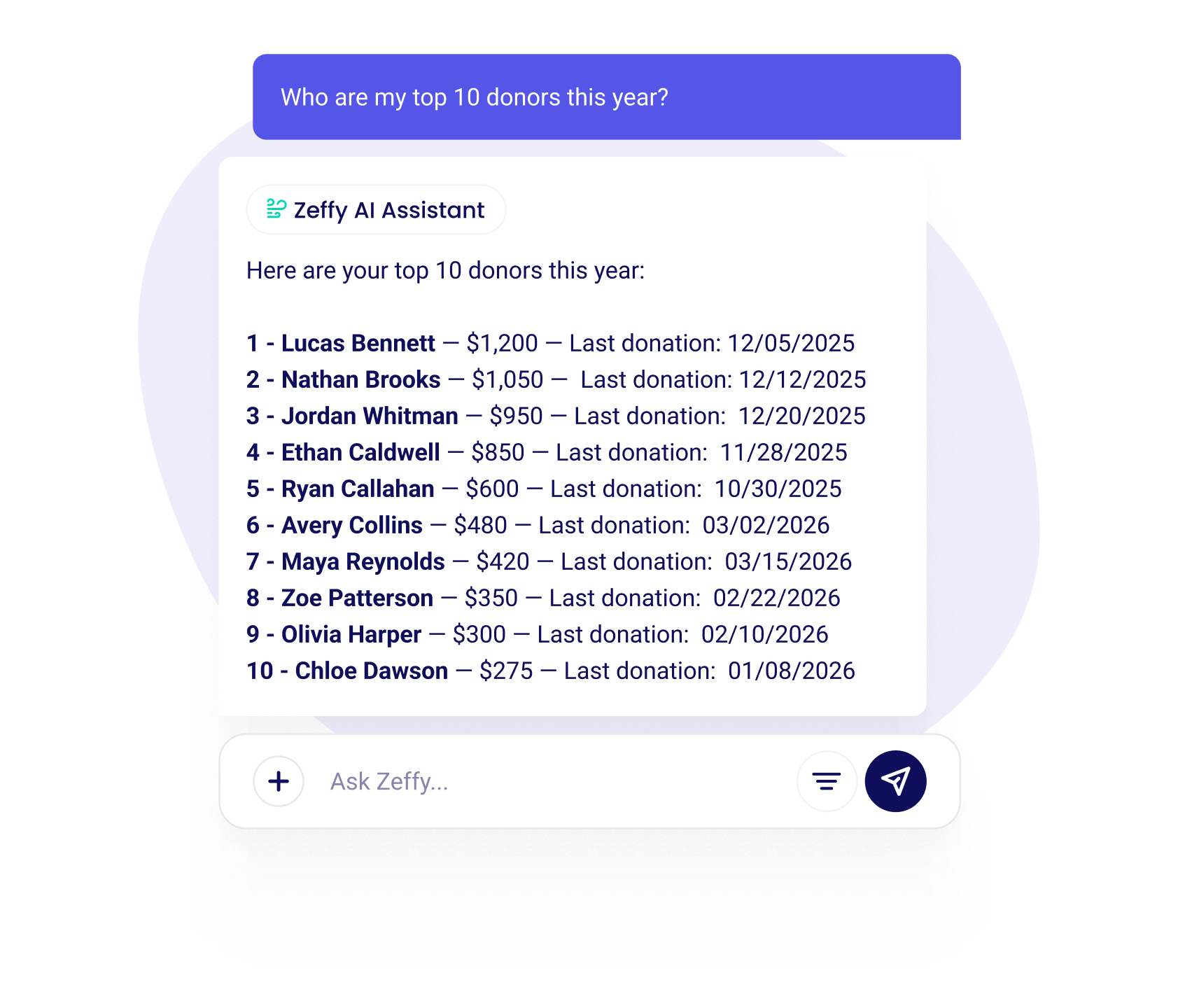
Ask your donor data anything
The Zeffy AI Assistant connects your fundraising data to ChatGPT and Claude, tools millions of people already use. No spreadsheets, no formulas, no CSV exports. Just type a question and get a specific answer.
Ask about your donors: "Who are my top donors this year?" "Who gave for the first time last month?" "Who's been giving monthly for over a year?" Ask about your campaigns: "Which campaigns raised the most last quarter?" "How much did we raise at the Spring Gala?" Ask anything you'd normally need a spreadsheet to figure out, and get names, amounts, and dates back in seconds.
The assistant pulls live data from your Zeffy account using the same secure, read-only API. No external tool can modify your Zeffy data. You can ask follow-up questions to dig deeper, just like a normal conversation.
No other nonprofit platform offers this today. Zeffy does, and it's free.
AI assistant pricing for nonprofits
Other fundraising platforms don't offer this at any price. Zeffy's AI assistant is completely free. No subscription, no hidden costs, no per-query charges. We stay free thanks to optional tips from donors. Nonprofits keep 100% of what they raise, and there are no platform, transaction, or credit card fees, ever.
FAQ
Can ChatGPT actually analyze my donor data?
Yes, safely — with Zeffy. Most guides tell nonprofits to export a spreadsheet and paste donor info into ChatGPT, which risks leaking private data. The Zeffy AI Assistant works differently: it connects your account directly, so ChatGPT can answer questions about your donors without ever seeing your full database. Your data stays in Zeffy. Only the answer comes out.
Is my data safe when using ChatGPT?
Your data stays safe. The connection is read-only and runs over a secure, encrypted channel. No tool can modify, create, or delete anything in your Zeffy account. When you ask a question, only the data needed to answer it is pulled live from your Zeffy account.
What kind of questions can I ask?
Anything about your donors, donations, or campaigns. "Who are my top donors?" "How much did we raise last month?" "Which campaign had the most first-time donors?" Ask in plain English and get specific answers back.
Can the AI modify my Zeffy data?
No. The AI assistant uses read-only access. It can pull your data to answer questions, but it cannot create, edit, or delete anything in your Zeffy account.
What's the best AI tool for nonprofits?
The best AI tool is the one connected to your actual data. The Zeffy AI Assistant works in ChatGPT and pulls live from your donor database. It's free for every organization on Zeffy, with no setup beyond copying an API key.
How do I connect Zeffy to ChatGPT or Claude?
ChatGPT: Search "Zeffy Assistant" in the GPT Store, click "Use," enter your API key.
Do I need technical skills to use the AI assistant?
No. If you can type a question, you can use it. The AI assistant is designed for everyone, not just developers.
Does it work in French?
Yes. ChatGPT handles French natively. Ask a question in French and you'll get the answer back in French. Your Zeffy data is language-agnostic, so Quebec-based nonprofits can query their donor information in French the same way they would in English.
Will I ever have to pay for this?
No. The AI assistant is free for every organization on Zeffy.
Zeffy est-il vraiment gratuit ?
Yes. Zeffy doesn't charge platform fees, transaction fees, or credit card fees. Nonprofits keep 100% of every dollar raised. We stay free thanks to optional tips from donors.
Nous soutenons vos efforts de collecte de fonds à chaque étape


100 000 associations collectent des fonds grâce à Zeffy
Zeffy soutient les organisations à but non lucratif depuis 7 ans. Il fournit des outils de collecte de fonds 100% gratuits et conviviaux.


%20(1).webp)

%20(1).webp)
.webp)
.webp)

%20(1).webp)


.webp)
Other integrations that you may need



.webp)


